
Java Runtime Memory: Object Storage and Class Loading
Java has many features, such as multithreading, class loading, garbage collection, syntactic sugar, rich official class libraries, an easy-to-understand object-oriented design, and platform compatibility. From a memory perspective, it can be viewed at a high level as two parts: static and dynamic. The static part is the memory space structure, and the dynamic part is memory allocation and reclamation. This article summarizes the memory structure in Java.
1. Memory Differences Between Languages
Compared with C, Java makes two different decisions in how it handles memory.
1.2 Memory Space Structure
For C, programmers view memory from the system’s perspective: a continuous array of bytes. At minimum, a C program is a process, and it maps directly to the operating system’s process-space allocation, including the program text and data, user stack, runtime heap, shared libraries, and kernel virtual memory that users cannot access. In a simple HelloWorld.c program, the code is stored in the text region, static variables are stored in the data region, function addresses and variables are pushed onto the user stack when a function is called, and data is stored in the runtime heap when malloc is used to allocate space.
For Java, the VM abstracts and encapsulates memory again. It divides memory into the thread-private program counter, virtual machine stack, native method stack, and the thread-shared heap and method area (in fact, the method area is also part of the heap). When a program creates an object with new, the object’s instance is stored in the heap, and the object’s information, methods, and static variables are stored in the method area.
In summary, in C, the unit of memory that programmers can access is an array of bytes; in Java, the unit of memory that programmers can access is an abstract object. Because registers can also access a byte-array memory unit, this means that C programmers can directly access the underlying layer and perform more operations. This is also one of the important reasons why C programmers look down on Java programmers. However, more access does not only mean more freedom; it also means more responsibility, because without object-level abstraction, large C programs in particular may unexpectedly throw buffer overflows, array out-of-bounds errors, garbled text, and other problems that are difficult to trace back to their root cause.
1.2 Memory Allocation and Reclamation
For C, programmers need to actively request and release memory. For Java, because the VM exists, the GC automatically reclaims unreachable objects. At the same time, when the GC thread reclaims garbage, it causes STW (Stop the World), which slows down program performance. In addition, because object cleanup is handled by the VM, the time at which an object is cleaned up is actually unpredictable. By comparison, C programmers can fully control the timing of memory allocation and reclamation and can completely know the state of memory, which Java programmers cannot do. However, if a C program forgets to free memory, it can also cause incalculable damage.
From the perspective of memory handling, C programs have unquestionable control over memory, while Java programs hand memory operations over to the VM after introducing an abstraction layer, turning them into indirect access. At the same time, because of the VM, Java programmers can write code freely without worrying about major bugs, which makes Java very easy to learn and also leads to uneven skill levels among Java programmers, a fact that has long been criticized in the industry.
2. Memory Structure in Java
The memory structure of Java is almost always a must-ask interview question, so let us review it again here.
The following memory structure is based on JDK 8
2.1 Basic Concepts
- Virtual machine stack: private to each thread; each non-native method corresponds to one stack frame. A stack frame includes the local variable table (the basic unit is a slot, which stores method parameters and internal variables), the operand stack (which stores calculation parameters and results), dynamic linking, and so on
- Native method stack: private to each thread; responsible for native methods
- Program counter: private to each thread; records the bytecode execution position of a thread
- Heap: shared by all threads; used to store instances. It is the largest area in the JVM and the main area managed by GC. In JDK 7 and earlier, it is divided into the young generation (Eden 8, From Survivor 1, To Survivor 1) and the old generation. The ratio of the young generation to the old generation is 1:2
- Method area: stores class structure information. Except for the runtime constant pool, everything else is stored in MetaSpace
- Runtime constant pool: at runtime, the data in the constant pool is placed here, including the string constant pool. This actually resides in the heap and can change dynamically, such as with
String#intern() - Constant pool: stores compile-time generated literals (text strings, the values of the eight basic types, and constants declared as
final) as well as symbolic references (the fully qualified names of classes and methods, field names and descriptors, and method names and descriptors). Its size is known before runtime. It is organized by class - Method bytecode: stores the bytecode of each method, which is interpreted and executed by the JVM by relying on the operand stack and local variable table
- Runtime constant pool: at runtime, the data in the constant pool is placed here, including the string constant pool. This actually resides in the heap and can change dynamically, such as with
For theoretical background, see Bleem1 (in Chinese), Bleem2 (in Chinese)
2.2 Program Demonstration
For a class, it mainly consists of two parts: attributes and methods. These two parts correspond one-to-one with data structures and algorithms in our computer science fundamentals. For a C program, data structures are stored in the heap and algorithms are stored in the code segment. Below, we use a program to show where these two parts of a Java program are stored.
The allocation scenario does not consider TLAB, JIT, escape analysis, and so on. It also does not consider regions such as Eden and Survivor
1 | class MemoryStructTest { |
When this program is compiled, class-loaded, initialized, and run, what does it look like in memory?
- After class loading, the information for the
MemoryStructTestclass is stored in the method area. This includes fields, methods, the constant pool, static variables, the class name, and so on - The final initialization step of class loading initializes the static variable
HELLO_WORLD. At this point, theStringclass is also class-loaded. TheStringclass is loaded into the method area in the same way described above, and the reference to theHELLO_WORLDstring is placed in the string constant pool, while the actual string is stored in the heap. The local variablehelloworldis stored in the virtual machine stack - After the program starts running, some content from the constant pool is copied into the runtime constant pool, and then the VM begins interpreting and executing the bytecode of the
mainmethod line by line in the method area - When execution reaches line 5, the
System.outclass is class-loaded into the method area, and then the static method in the method area is invoked to print the local variablehelloWorld
The following diagram can be obtained:

One thing to note is that for String and the basic types, if they are not explicitly created with new, they reside in the constant pool. If they are created with new, they are created in the heap.
3. Storage Formats of Specific Types
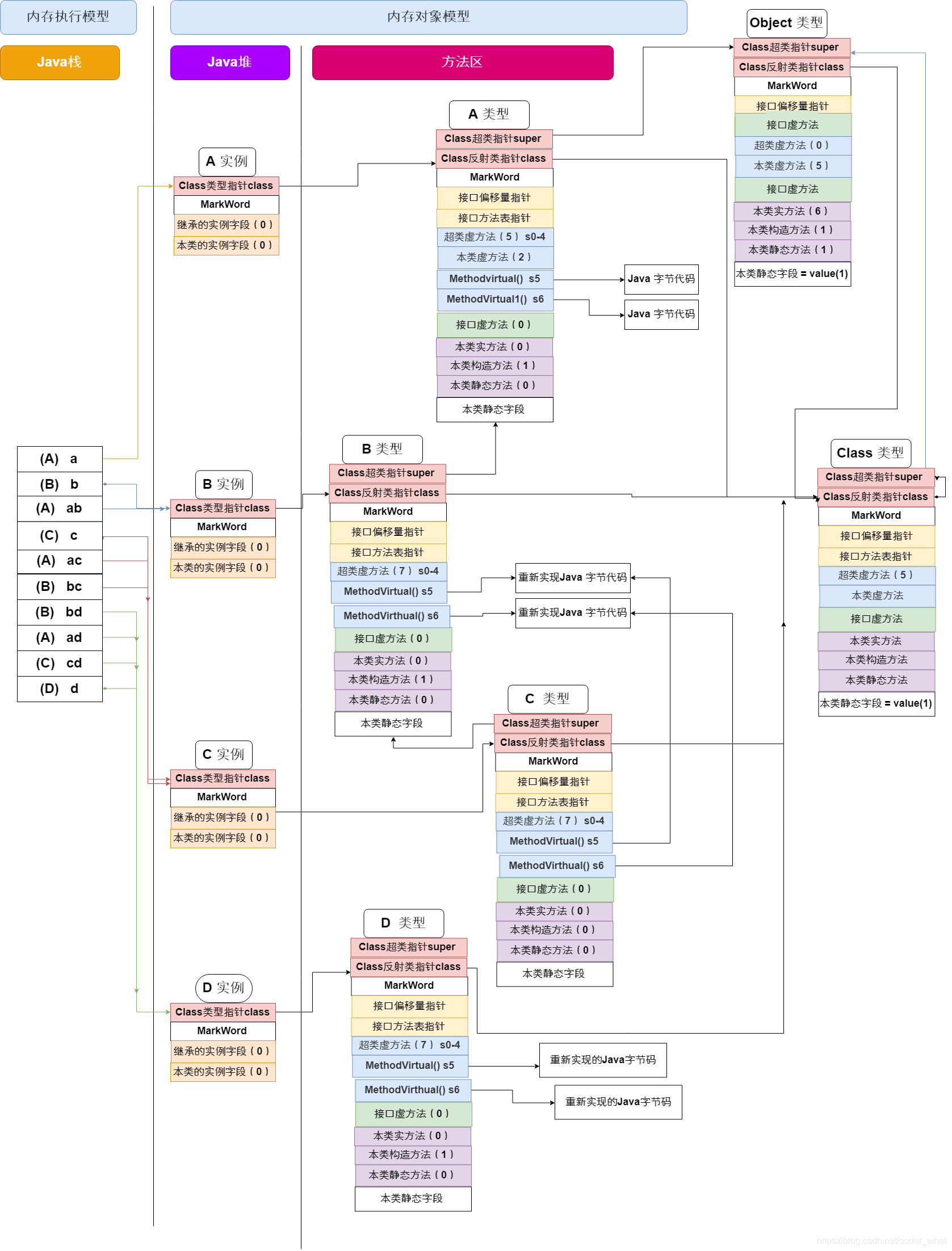
3.1 Storage Format of a Parent Class
This is a memory diagram I drew in my sophomore year of college. Looking at it now, it still has some value, so I am sharing it again:
1 | class A { |
3.2 Storage Format of an Interface
1 | interface I { |
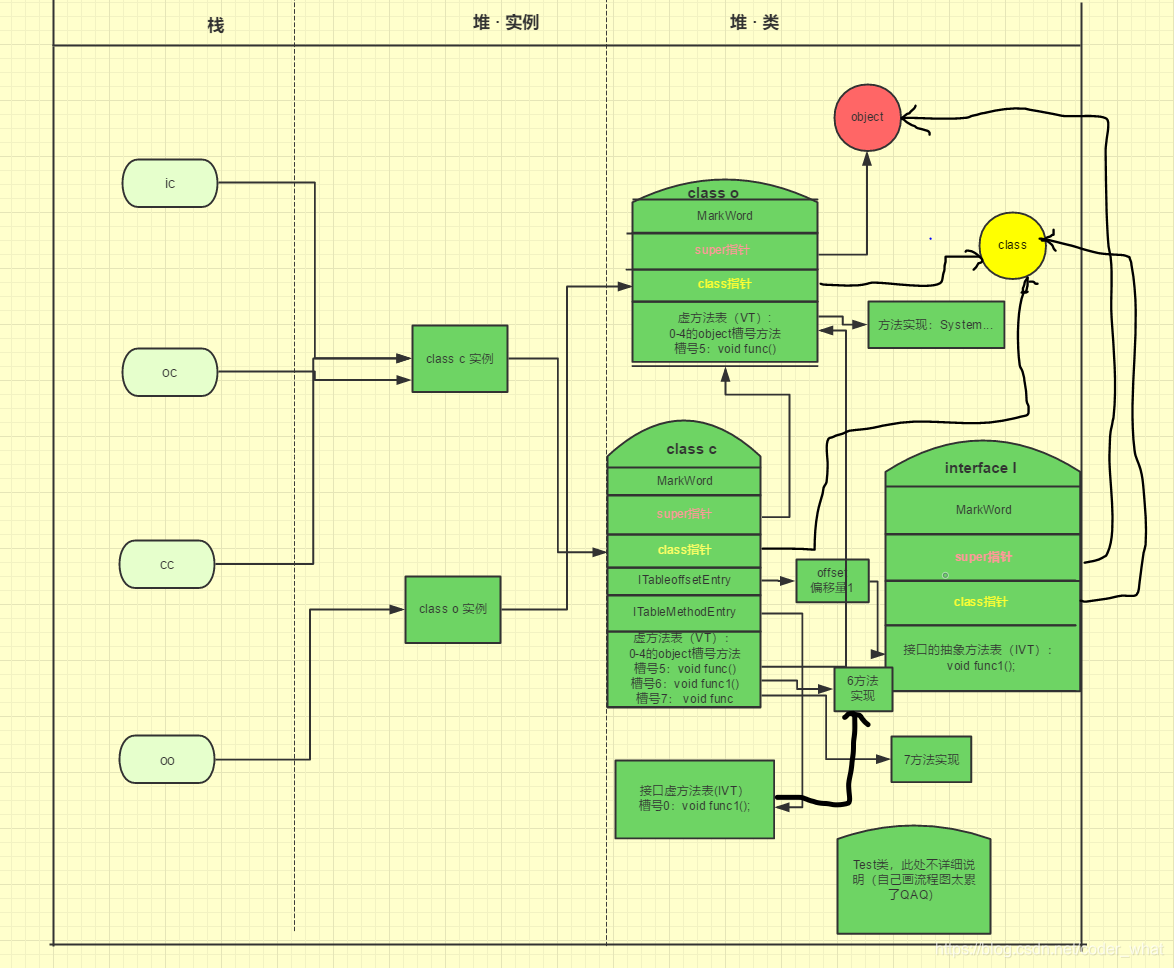
PS: The “heap · class” label above should be changed to “method area”.
3.3 Storage Format of an Inner Class
An inner class is parsed through syntactic sugar into an ordinary class, and then it is the same as above.
3.4 Storage Format of an Array
In Java, an array is also an object. This abstraction greatly improves the safety of array operations and avoids the array out-of-bounds memory overwrite problems seen in C programs.
A program containing arrays, interfaces, classes, and inheritance:
Note: This program is entirely a demo for illustrating the memory logic model of interfaces, classes, and so on
Also: this program is somewhat redundant, but it can indeed illustrate inheritance relationships. The memory logic model was drawn by hand, and only some important parts were drawn, not as detailed as the previous program
1 | package chapter06; |
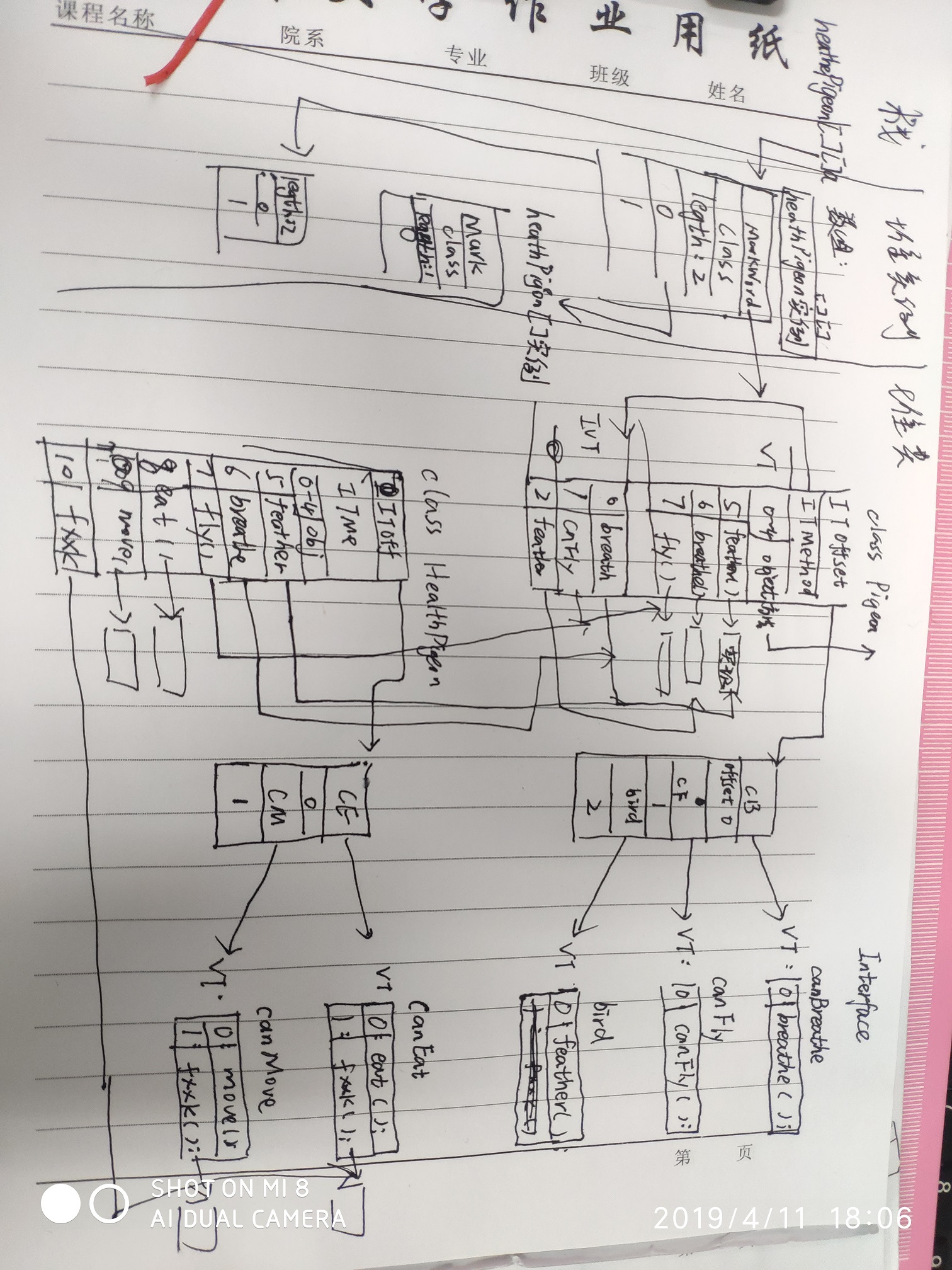
3.5 Storage Format of Basic Data Types
For basic data types, if they are local variables, they are directly allocated on the stack according to the byte specification. If they are global variables of a class, they are allocated in the heap along with the initialization of the instance.
If a certain attribute of a class instance is another instance, then there is a pointer to that other instance. If the attribute is a basic type, then there is no pointer; the space of that many bytes is allocated directly.
Basic type sizes:
byte1 byte,char2 bytes,short2 bytes,int4 bytes,float4 bytes,long8 bytes,double8 bytes,booleanunspecified
4. Afterword
Actually, I already knew all of these things at this time last year, but I did not yet have a coherent overall picture. After summarizing them today, I finally had a feeling of sudden clarity.
But the more I understand, the more I realize how much I still do not know. Keep going.
No matter how elegant the data model provided by a high-level language is, after it is compiled into machine code, it is simply a large array addressed by byte (8 bits). And when a machine accesses memory, it does so through addresses.
What is the difference between a 32-bit machine and a 64-bit machine? It refers to the address bus. A 32-bit machine means the program’s address can occupy 4 bytes, and the accessible address space is 4 GB. A 64-bit machine means the program’s address can occupy 8 bytes, and the accessible address space is 2^64 bytes