
Handling Message Idempotency in Queue Consumers
Recently, while integrating with another business, I found a problem:
When consuming messages from an upstream business, an unusual upstream situation caused multiple messages to be sent at the same time (status-change messages, with the status changing several times in one moment). Since the consumer had no idempotency protection, it consumed the messages repeatedly. In this case, that resulted in two rows being inserted.
How do we solve it? It is actually simple: lock the conflicting resource. There are several approaches.
Approach 1: Distributed lock
- Add a distributed lock to the current consumption logic by user.
- If it has already been consumed, do not consume it again.
- If it has not been consumed, consume it.
The pseudocode is:
1 | public void consume(Message msg) { |
Approach 2: Database unique index
Most current Web services are deployed as clusters, so a lock must be distributed. Although databases may use sharding, for the same shard key a record from one consumption will always land in one physical database and one physical table.
We can therefore use a unique index on the single physical database and let the database provide the lock. If insertion fails, simply catch an exception such as Duplicate entry.
Approach 3: Special SQL statements
These essentially also depend on a unique index.
insert ignore
insert ignore ignores data already present in the database (determined by the primary key or unique index). If no data exists, it inserts a new row; if data exists, it skips the row.
1 | insert ignore into sc (name,class,score) values ('张三','三年二班',90) |
Running the statement produces no error, but the primary key still auto-increments.
replace into
replace into first attempts to insert data into the table. If the row already exists (determined by the primary key or unique index), it first deletes the row and then inserts a new one; otherwise it inserts a new row directly.
1 | replace into sc (name,class,score) values ('张三','三年二班',90); |
insert on duplicate key update
- If
on duplicate key updateis specified at the end of aninsert intostatement and inserting the row would create a duplicate value in a UNIQUE index or PRIMARY KEY, the duplicate row is updated. If there is no duplicate, a new row is inserted as with an ordinaryinsert into. - If a new row is inserted, the affected-row count is 1; if an existing row is updated, it is 2; if the value is unchanged before and after the update, it is 0.
1 | insert into sc (name,class,score) values ('张三','三年二班',90) on duplicate key update score=100; |
Approach 4: Transaction + exclusive lock
InnoDB reads use MVCC, so an ordinary select does not block. We can use a database transaction to lock during the query. Other queries are then blocked, and we insert if nothing is found. The SQL is:
1 | select * from c where name = '张三' for update; |
Approach 4 resembles approach 1, except approach 1 locks at the service level while this approach uses a database lock. The following examples use the RR isolation level.
The relationship between indexes and locks
Primary-key index
Start a transaction with an indexed where condition:
1 | begin; |
The lock state is:
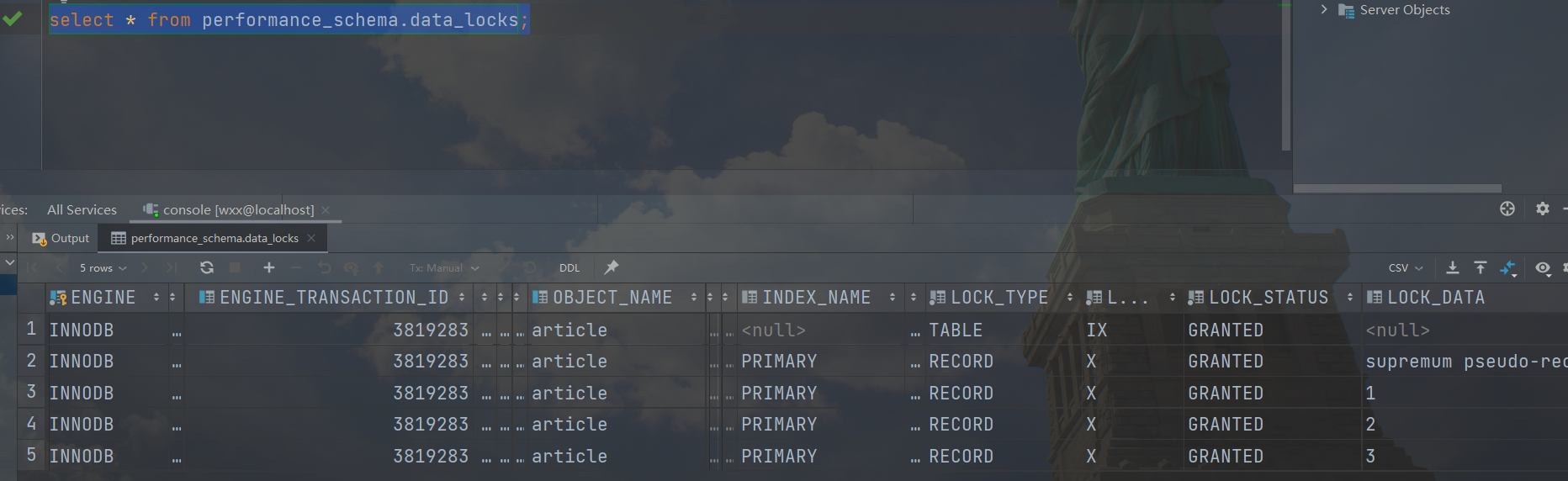
Both the table and row are locked: the table has an intention-exclusive lock, and the row has a standard exclusive lock (only the record, not the gap). Therefore, another transaction attempting an exclusive-lock SQL statement will fail:
1 | select * from article where id = 3 for update ; |
PS, the purpose of an intention lock:
Without an intention lock, obtaining an exclusive table lock would require traversing every record to check whether any record had an exclusive lock, which would be slow.
With an intention lock, an intention-exclusive table lock is added before an exclusive record lock. When obtaining an exclusive table lock, we can simply check whether the table has an intention-exclusive lock. If it does, records in the table already have exclusive locks, so there is no need to traverse them.
Therefore, the purpose of an intention lock is to quickly determine whether any record in a table is locked.
No index
Start a transaction with the following condition:
1 | begin; |
The lock state is: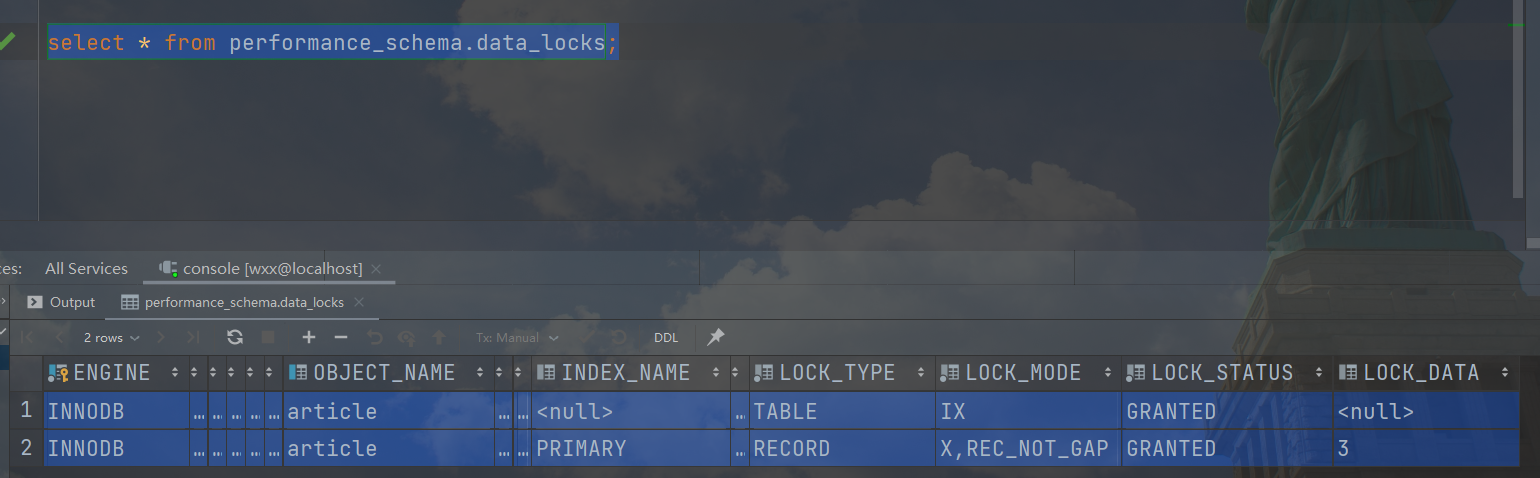
We can see that the table also has an intention-exclusive lock. However, every record receives a fully exclusive lock (locking both the row and the gap), effectively locking the entire table. This is dangerous because other transactions cannot perform locking operations on the table.
Locking when there is no match
For a case without an index, the locking logic is the same as for a match. Here we look at how locking works when there is an index but no match.
1 | begin; |
The lock state is: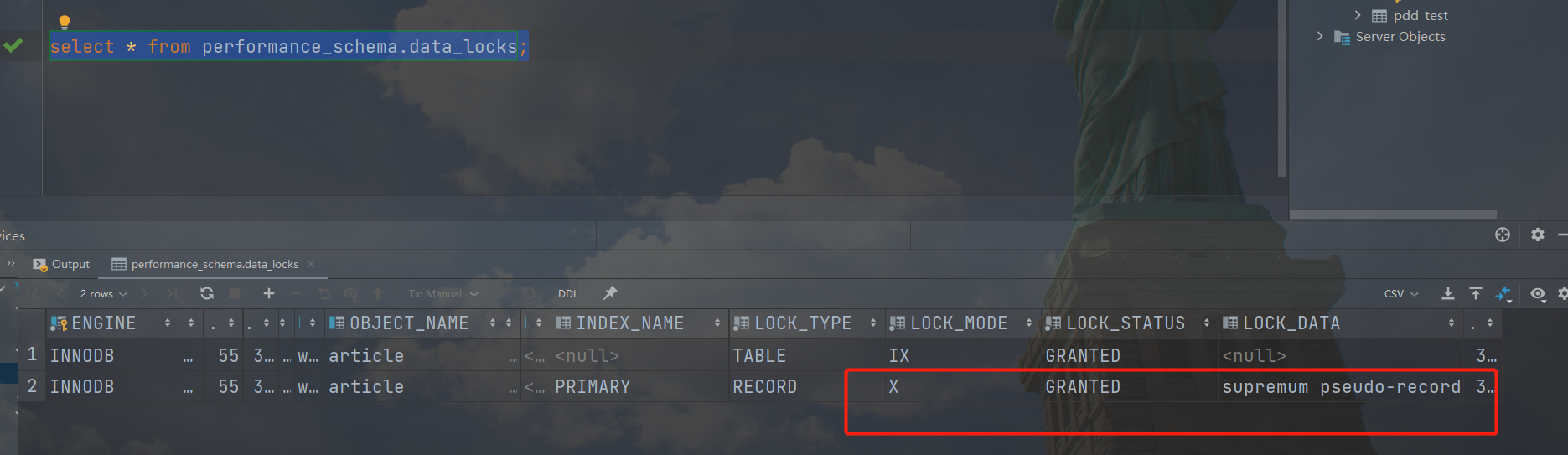
The row receives a fully exclusive lock covering the range from 3 to positive infinity. Nothing can be inserted or updated between 3 and positive infinity.
primary key value(s) of the locked record if LOCK_TYPE=’RECORD’, otherwise NULL. This column contains the value(s) of the primary key column(s) in the locked row, formatted as a valid SQL string (ready to be copied to SQL commands). If there is no primary key then the InnoDB internal unique row ID number is used. If a gap lock is taken for key values or ranges above the largest value in the index, LOCK_DATA reports “supremum pseudo-record”. When the page containing the locked record is not in the buffer pool (in the case that it was paged out to disk while the lock was held), InnoDB does not fetch the page from disk, to avoid unnecessary disk operations. Instead, LOCK_DATA is set to NULL